
Visits
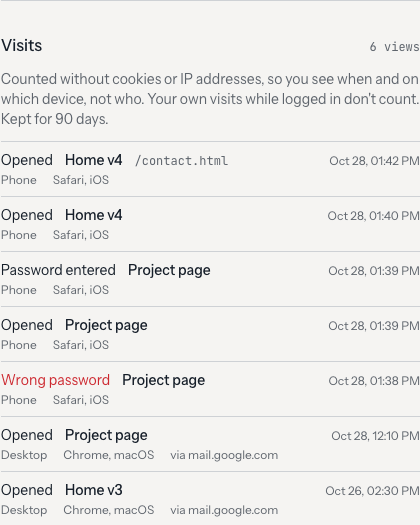
prevju shows whether and when your client opened a link. Each site and project card says opened 2 hours ago or not opened yet; the site and project pages list the visits.
What is recorded
- Page views: every HTML page of a site, and the client page of a project. Images, CSS and JS don't count.
- Password attempts: right and wrong passwords, so you can tell whether the client got in.
- Per visit: time, page, device type (desktop, phone, tablet), browser, operating system and the domain the link was clicked on (e.g.
mail.google.com).
On a project page you see the visits of the project link and of all its sites, each with the version it was.
What is not recorded
- Your own visits while logged in to the admin, and the previews in the admin.
- Link previews from WhatsApp, Slack, Teams, iMessage and similar. They fetch the page as soon as you send the link, before anyone clicks.
- IP addresses and cookies. prevju stores no IP and sets no tracking cookie.
- Link checkers and browser prefetches that only peek at the page.
Some company mail filters (e.g. Microsoft Defender) open links with a normal browser before delivering the mail. prevju can't tell those apart from the client, so a visit right after you sent the link may be such a filter.
Privacy
Visits are anonymous. Instead of an IP, each visit gets a visitor hash made from the shortened IP, the browser and a random salt that changes every day and is thrown away after two days. Two visits with the same hash on the same day come from the same browser. Across days, and back to a person, the hash leads nowhere.
You see when and on which device, not who. If you send one link to several people, you can't tell them apart.
Because prevju neither stores personal data in the clear nor sets cookies, no consent banner is needed in typical setups. You run prevju yourself, so you are responsible for the data: mention it in your privacy policy (e.g. "page views on preview links, without IP addresses or cookies, deleted after 90 days").
Retention
Visits are deleted after 90 days. Change it with VISITS_RETENTION_DAYS in the .env next to your compose file and pass it on in docker-compose.yml:
    environment:
      VISITS_RETENTION_DAYS: "${VISITS_RETENTION_DAYS:-90}"
VISITS_RETENTION_DAYS=0 turns recording off. Old visits are cleaned up along the way, no cron job needed.
Over API and MCP
- API:
GET /api/visitswithfilter[site_id],filter[project_id],filter[kind](view,unlock,unlock_failed),filter[since]andfilter[until]. Sites and projects carryview_countandlast_viewed_at. See REST API. - MCP:
list-visitswithsite_idorproject_id, so you can ask your agent "has the client looked at it yet?". See MCP.